Configuración
 Entrega rápida
 Entrega Gratis
 Incoterms
 Tipos de pago


 Producto del mercado

Número de parte del fabricante 3405
HUZZAH32 ESP32 FEATHER LOOSE HDR
Adafruit Industries LLC

In this and upcoming articles, we’ll focus on getting sensors connected to the Adafruit Huzzah32 and then programming the circuit via Atmosphere IoT Studio. In this how-to, we are looking at the KMA36 rotation sensor, which can be used for accurate rotation detection. The KMA36 itself is a small SMD encoder sensor that can measure external magnetic fields with a resolution of up to 13-bits. The use of magnetic fields means that the sensor is contactless and therefore can be used to measure the entire 0° to 360° range. Measuring rotation can be very important in IoT environments, including automated doors and windows (to record how far open they are), wind direction for anemometers, and even robotic arm positioning.
The KMA36 is the IC that is responsible for detecting rotation, but instead of using the IC on its own, we will be using the DPP401A000 module. This module integrates the sensor onto an easy-to-use board, as well as providing a small, free-moving magnetic wheel that sits above the sensor. The KMA36 module appears to have two main ways in which it can be operated:
1. Non-contact: A piece of ferromagnetic material can be placed near the free-moving magnetic wheel, and the wheel will align itself to the metal. As the metal is moved, the wheel will turn.
2. Contact: The magnetic wheel can be physically pushed to make contact with a surface. As the surface moves, the wheel is turned. However, the wheel may be delicate, so take caution when using this method.
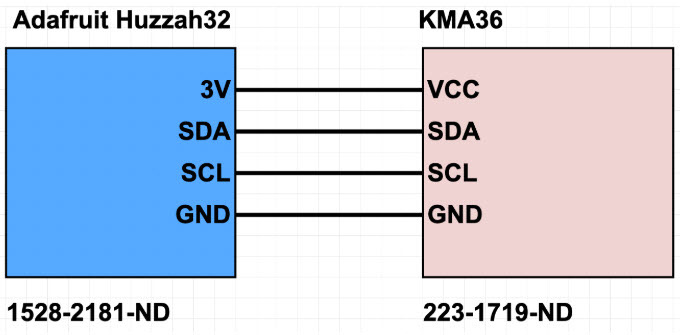
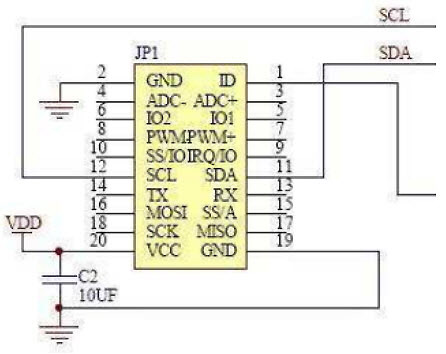
The DPP401A000 has an intimidating-looking connector with 20 pins, but luckily for us, only two data wires are needed, as well as a power and ground connection (making a total of four wires). The diagram below shows the partial schematic of the module and the four wires that we need to connect to the Adafruit Huzzah32.
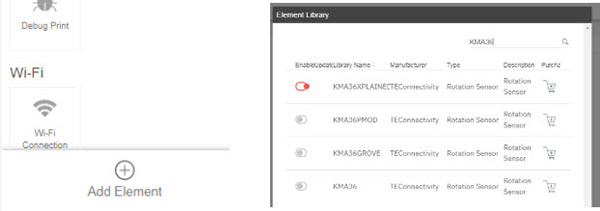
The first step with using the KMA36 in the Atmosphere IoT Studio is to include the KMA36 sensor library to our project. To do this, click the plus icon above the “Add Element” label (below the Element Toolbox). In the window that appears, search for KMA36 and select the entry called KMA36XplainedPro. This refers to the specific module that we are using.
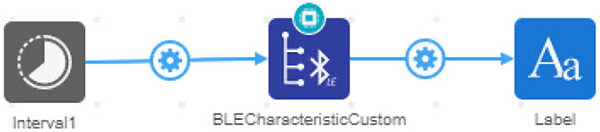
In the device programming window, we will add an interval element, the KMA36 element, and a BLE Characteristic element that will allow us to send rotation readings to the Bluetooth App. The interval element will trigger a rotation read once a second, and the KMA36 will send the value over Bluetooth every time it has performed a read. It is important to ensure that the Bluetooth element is set to integer or float (as opposed to string) since we are sending numbers. Also, ensure that the connector between the KMA36 and the BLE elements is set upon angle read as opposed to interrupt or triggered.

The KMA36 also offers a range of different options that can be useful in precision as well as power. The first few options are regarding I2C address and the I2C driver, but these can be left as is (these would be important if the KMA36 sensor was being used by itself as opposed to a module). The oversampling mode allows for lower accuracy but is most likely irrelevant in simple IoT projects. The other two important options are the resolution and the low power mode. The resolution will allow for more precise measurements, while the power mode can be helpful in power restrictive environments.
The application side is also very simple and only consists of three elements; an interval element, a BLE element, and a label. Once every second, the interval element triggers the BLE for the latest data, and this value is then sent to the label for demonstration.
The KMA36 sensor allows for rotational measurements without any contact and this has some major advantages. One clear advantage is the ability to have the full 360° of rotation without any worry of wires, and another is that no bearings or fittings will wear down (as only magnetism is being measured). However, magnetic encoders are not without issues: they are, notably, susceptible to external magnetic fields. These sensors must not be in the presence of other magnetic fields during operation, as the fields will confuse the sensor and produce false readings.




 México
Copyright © 1995-2026, DigiKey.
Todos los derechos reservados.
Términos y condiciones
Aviso de privacidad
Configuración de cookies
México
Copyright © 1995-2026, DigiKey.
Todos los derechos reservados.
Términos y condiciones
Aviso de privacidad
Configuración de cookies