Configuración
 Entrega rápida
 Entrega Gratis
 Incoterms
 Tipos de pago


 Producto del mercado


MangOH Red
Descripción de producto
El dispositivo mangOH™ Red es una plataforma de Internet de las cosas (IoT) de bajo consumo, capaz de funcionar con la energía de la batería por hasta 10 años. Según mangoh.io es:
- Un factor de forma del tamaño de una tarjeta de crédito, ideal para construir rápidamente las pruebas de concepto,
- Un enchufe a presión para agregar cualquier módulo CF3™ compatible, incluidos los módulos inalámbricos (de 2G a 4G y LTE-M/NB-IoT) para alcanzar hasta los 10 años de vida de la batería (el módulo CF3 usado para este artículo fue el WP8548_1103113 DigiKey (número de pieza1645-1022-1-ND);
- Una ranura de tarjeta de expansión IoT para conectar cualquier tecnología basada en el estándar abierto de la Tarjeta de Expansión IoT;
- Una SIM Smart integrada de Sierra Wireless con hasta 100 MB de datos gratuitos, dependiendo de la región, y también se puede utilizar con cualquier tarjeta SIM disponible comercialmente,
- Se integra con la plataforma IoT AirVantage para crear, implementar y administrar soluciones en la nube;
- Wi-Fi b/g/n y Bluetooth 4.2 BLE incorporados con un Cortex-M4 para proporcionar acceso en tiempo real a E/S; y
- Acelerómetro/giroscopio integrado, sensores de presión y de luz junto con un conector de 26 pines compatible con Raspberry Pi (el cable conector es el número de pieza 1597-1065-ND de DigiKey).
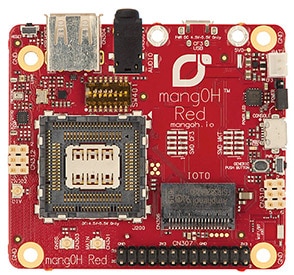 (Fuente de la imagen: Talon Communications Inc.)
¿Qué incluye la caja?
La caja que abrimos incluye lo siguiente:
- mangOH Red
- Módulo CF3 (en nuestro caso WP8548_1103113)
- Cable micro-USB
- 2 antenas (1 principal y 1 de Sistema Global de Navegación por Satélite (GNSS))
- Tarjeta micro-SIM Sierra Wireless con la asignación inicial de datos
Configuración del hardware
Siga las instrucciones de configuración que se encuentran en la Guía de instalación y de usuario de mangOH Red.
Hay dos puertos micro-USB en el mangOH Red.
La configuración del hardware resultó simple: se enchufa el micro-USB en mangOH y en una computadora, se conecta la antena, y se coloca la tarjeta SIM en la ranura de la parte posterior de la mangOH. La siguiente figura muestra la ilustración de la arquitectura de hardware de la Gúia de Desarrolladores de mangOH Red:
 (Fuente de la imagen: Talon Communications Inc.)
Conector Raspberry Pi
El número de pieza de DigiKey para el conector de cable de cinta es 1597-1065-ND. Las siguientes imágenes muestran el diagrama de pines para ambos la Raspberry Pi (el diagrama de pines de la Rspberry Pi tiene los pines utilizados por la MangOH Red sombreada) y la MangOH Red: Las conexiones son el pin 1 al pin 1, pin 2 al pin 2, etc.
 (Fuente de la imagen: pinout.xyz)
 (Fuente de la imagen: Talon Communications Inc.)
Configuración del software
La configuración del software resultó un poco más complicada. Al iniciar el camino para trabajar con este dispositivo, vale la pena señalar que hay tres entidades implicadas en el producto final de la mangOH. MangOH Red es la placa en sí, Sierra Wireless es el fabricante del módulo CF3 así como el propietario de AirVantage, que es la nube IoT que almacena los datos de la mangOH, y Legato, la interfaz de línea de comandos (CLI) basada en Linux que se utiliza para conectar con la mangOH. Voy a examinar cada una de ellas y cómo conectarse a sus foros a medida que avanzamos en nuestro camino.
El primer sitio para visitar es el sitio web de Introducción a mangOH. Puede elegir entre los sistemas operativos Windows o Linux (el SO de Mac es compatible, pero hablaré de eso más adelante). Cualquiera que sea el sistema operativo que usted elija, usted todavía necesitará incorporar Legato CLI a través de una máquina virtual (Oracle VirtualBox) en Windows o un add-on para el desarrollo de Legato en Linux. El manual de instalación de Windowsy elmanual de instalación de Linux son excelentes recursos para utilizar cuando configura su máquina por lo tanto no repetiré aquí esa información.
Si está utilizando una máquina Linux de 64 bits, preste atención a la sección 6 en la página 16 del manual de instalación de Linux.
También debe descargar Developer Studio, que está disponible para Windows, Linux y sistemas operativos Mac. Según el sitio web de Sierra Wireless, "Developer Studio Sierra Wireless es el entorno de desarrollo integrado (IDE) para Legato Application Framework". Esto significa que usted tiene dos opciones para crear sus propias aplicaciones; puede utilizar un programa de texto básico o puede utilizar Developer Studio, que está basado en gráficos y automatizar una parte de la creación del archivo/carpeta. He descargado el Developer Studio para cada sistema operativo y el único inconveniente que tuve fue el requisito de Java 8 para el SO Mac; la instalación normal de Java 8 no fue suficiente para ejecutar el Developer Studio, por alguna razón, así que tuve que realizar la descarga y la instalación del Kit de desarrollo 8u151 de Java SE desde Oracle.
Estructura de archivos y aplicaciones de muestra
El mejor lugar para empezar, después de haber configurado la mangOH, es Legato en Github. Descargar o clonar la carpeta Legato. Usted también querrá visitar las explicaciones de aplicaciones de muestra de Legato para algunas de las muestras que ha descargado en Github. El sitio web de aplicaciones de muestra de Legato también es un gran recurso para los "procedimientos".
Se debe prestar atención a la estructura del archivo. Cada aplicación tiene la siguiente estructura de directorios/archivos:

La estructura del archivo también puede incluir tipos de archivos .API y .h, dependiendo de la aplicación. La parte central de la programación está en el archivo .c, mientras que los otros archivos son instrucciones para el compilador para crear la aplicación.
Ejemplo: Aplicación del texto ubicación GNSS
La aplicación de ejemplo que ilustra mucho de lo que puede hacer la mangOH Red es la app que envía las coordenadas de mangOH Red al usuario. La estructura del archivo está en la parte superior.
El código del archivo textLoc.c se incluye a continuación. Haga clic aquí para ver el artículo Descubrir un Producto Nuevo de Randall Restle donde presenta la mangOH Red por primera vez.
Copia
textLoc.c
    //--------------------------------------------------------------------------------------------------
/** @file textLoc.c
*
* This app illustrates a sample usage of ultra low power mode API. This app reads the current gps
* location and then sends it as a text message to a destination cell phone number. Once the text
* message has been sent, the device enters ultra low power mode. The device will wake up from
* ultra low power mode after a configurable delay.
*
* @note This app expects destination cell number to be specified in environment variable section
* of adef file. If nothing specified in environment variable, it will send message to a default
* non-existent phone number.
*
* Copyright (C) Sierra Wireless Inc.
*/
//--------------------------------------------------------------------------------------------------

#include "legato.h"
/* IPC APIs */
#include "interfaces.h"

//--------------------------------------------------------------------------------------------------
/**
* GPS timeout interval in minutes
*
* @note Please change this timeout value as needed.
*/
//--------------------------------------------------------------------------------------------------
#define GPSTIMEOUT 15

//--------------------------------------------------------------------------------------------------
/**
* Default phone number to send location information.
*
* @note This is a non-existent phone number (ref:
* https://en.wikipedia.org/wiki/Fictitious_telephone_number).
*/
//--------------------------------------------------------------------------------------------------
#define DEFAULT_PHONE_NO "8005550101"

//--------------------------------------------------------------------------------------------------
/**
* Timer interval(in seconds) to exit from shutdown/ultralow-power state.
*
* @note Please change this interval as needed.
*/
//--------------------------------------------------------------------------------------------------
#define ULPM_EXIT_INTERVAL 30

//--------------------------------------------------------------------------------------------------
/**
* Gpio used to exit from shutdown/ultralow-power state.
*
* @note Please change gpio number as needed.
*/
//--------------------------------------------------------------------------------------------------
#define WAKEUP_GPIO_NUM 38

//--------------------------------------------------------------------------------------------------
/**
* Pointer to the null terminated string containing the destination phone number.
*/
//--------------------------------------------------------------------------------------------------
static const char *DestPhoneNumberPtr;

//--------------------------------------------------------------------------------------------------
/**
* Attempts to use the GPS to find the current latitude, longitude and horizontal accuracy within
* the given timeout constraints.
*
* @return
* - LE_OK on success
* - LE_UNAVAILABLE if positioning services are unavailable
* - LE_TIMEOUT if the timeout expires before successfully acquiring the location
*
* @note
* Blocks until the location has been identified or the timeout has occurred.
*/
//--------------------------------------------------------------------------------------------------
static le_result_t GetCurrentLocation(
int32_t *latitudePtr, ///< [OUT] latitude of device - set to NULL if not needed
int32_t *longitudePtr, ///< [OUT] longitude of device - set to NULL if not needed
int32_t *horizontalAccuracyPtr, ///< [OUT] horizontal accuracy of device - set to NULL if not
///< needed
uint32_t timeoutInSeconds ///< [IN] duration to attempt to acquire location data before
///< giving up. A value of 0 means there is no timeout.
)
{
le_posCtrl_ActivationRef_t posCtrlRef = le_posCtrl_Request();
if (!posCtrlRef)
{
LE_ERROR("Can't activate the Positioning service");
return LE_UNAVAILABLE;
}

le_result_t result;
const time_t startTime = time(NULL);
LE_INFO("Checking GPS position");
while (true)
{
result = le_pos_Get2DLocation(latitudePtr, longitudePtr, horizontalAccuracyPtr);
if (result == LE_OK)
{
break;
}
else if (
(timeoutInSeconds != 0) &&
(difftime(time(NULL), startTime) > (double)timeoutInSeconds))
{
result = LE_TIMEOUT;
break;
}
else
{
// Sleep for one second before requesting the location again.
sleep(1);
}
}

le_posCtrl_Release(posCtrlRef);

return result;
}

//--------------------------------------------------------------------------------------------------
/**
* Sends an SMS text message to the given destination with the given message content.
*
* @return
* - LE_OK on success
* - LE_FAULT on failure
*/
//--------------------------------------------------------------------------------------------------
static le_result_t SendTextMessage(
const char *destinationNumberPtr, ///< [IN] Phone number to send the text message to as ASCII
///< values
const char *messageBodyPtr ///< [IN] Text message body content
)
{
le_result_t result = LE_OK;
LE_INFO("Sending SMS");

le_sms_MsgRef_t sms = le_sms_Create();

if (le_sms_SetDestination(sms, destinationNumberPtr) != LE_OK)
{
result = LE_FAULT;
LE_ERROR("Could not set destination phone number");
goto sms_done;
}

if (le_sms_SetText(sms, messageBodyPtr) != LE_OK)
{
result = LE_FAULT;
LE_ERROR("Could not set text message body");
goto sms_done;
}

if (le_sms_Send(sms) != LE_OK)
{
result = LE_FAULT;
LE_ERROR("Could not send SMS message");
goto sms_done;
}

LE_INFO("SMS Message sent");

sms_done:
le_sms_Delete(sms);
return result;
}

//--------------------------------------------------------------------------------------------------
/**
* Send the device location as a text message
*
* Attempts to send an SMS text message containing the current device location to the destination
* phone number.
*
* @note
* No failure notification is provided if location services or SMS send are unsuccessful.
*/
//--------------------------------------------------------------------------------------------------
static void SendSmsCurrentLocation(
void
)
{
char smsBody[LE_SMS_TEXT_MAX_LEN];
int32_t latitude;
int32_t longitude;
int32_t horizontalAccuracy;

const le_result_t result =
GetCurrentLocation(&latitude, &longitude, &horizontalAccuracy, GPSTIMEOUT * 60);
if (result == LE_OK)
{
snprintf(smsBody, sizeof(smsBody), "Loc:%d,%d", latitude, longitude);
}
else
{
strncpy(smsBody, "Loc:unknown", sizeof(smsBody));
}
SendTextMessage(DestPhoneNumberPtr, smsBody);
}

//--------------------------------------------------------------------------------------------------
/**
* Configure the boot source and shutdown MDM.
*/
//--------------------------------------------------------------------------------------------------
static void CfgShutDown
(
void
)
{
// Boot after specified interval.
if (le_ulpm_BootOnTimer(ULPM_EXIT_INTERVAL) != LE_OK)
{
LE_ERROR("Can't set timer as boot source");
return;
}

// Boot on gpio. Please note this is platform dependent, change it when needed.
if (le_ulpm_BootOnGpio(WAKEUP_GPIO_NUM, LE_ULPM_GPIO_LOW) != LE_OK)
{
LE_ERROR("Can't set gpio: %d as boot source", WAKEUP_GPIO_NUM);
return;
}

// Initiate shutdown.
if (le_ulpm_ShutDown() != LE_OK)
{
LE_ERROR("Can't initiate shutdown.");
}
}

//--------------------------------------------------------------------------------------------------
/**
* Callback function to handle change of network registration state.
*/
//--------------------------------------------------------------------------------------------------
static void RegistrationStateHandler
(
le_mrc_NetRegState_t state, ///< [IN] Network registration state.
void *contextPtr ///< [IN] Context pointer.
)
{
switch(state)
{
case LE_MRC_REG_HOME:
case LE_MRC_REG_ROAMING:
LE_INFO("Registered");
SendSmsCurrentLocation();
LE_INFO("Now configure boot source and shutdown MDM");
CfgShutDown();
break;
case LE_MRC_REG_SEARCHING:
LE_INFO("Searching...");
break;
case LE_MRC_REG_NONE:
LE_INFO("Not registered");
break;
case LE_MRC_REG_DENIED:
LE_ERROR("Registration denied");
break;
case LE_MRC_REG_UNKNOWN:
LE_ERROR("Unknown registration state");
break;
}
}

//--------------------------------------------------------------------------------------------------
/**
* Simulate entry into the current NetReg state by calling RegistrationStateHandler
*
* RegistrationStateHandler will only be notified of state change events. This function exists to
* simulate the change into the current state.
*/
//--------------------------------------------------------------------------------------------------
static void SimulateNetRegStateChangeToCurrentState(
void *ignoredParam1, ///< Only exists to allow this function to conform to the
///< le_event_DeferredFunc_t declaration
void *ignoredParam2 ///< Only exists to allow this function to conform to the
///< le_event_DeferredFunc_t declaration
)
{
le_mrc_NetRegState_t currentNetRegState;
LE_FATAL_IF(le_mrc_GetNetRegState(¤tNetRegState) != LE_OK, "Couldn't get NetRegState");
RegistrationStateHandler(currentNetRegState, NULL);
}

//--------------------------------------------------------------------------------------------------
/**
* Get the destination phone number.
**/
//--------------------------------------------------------------------------------------------------
static void GetDestinationCellNo
(
void
)
{
DestPhoneNumberPtr = getenv("DEST_CELL_NO");
if (!DestPhoneNumberPtr)
{
LE_WARN(
"No destination cell number is specified. Using a default non-existent number");
DestPhoneNumberPtr = DEFAULT_PHONE_NO;
}

LE_INFO("Destination phone number = %s", DestPhoneNumberPtr);
}


COMPONENT_INIT
{
char version[LE_ULPM_MAX_VERS_LEN + 1];

LE_INFO("TextLoc started");

// Get ultra low power manager firmware version
LE_FATAL_IF(
le_ulpm_GetFirmwareVersion(version, sizeof(version)) != LE_OK,
"Failed to get ultra low power firmware version");
LE_INFO("Ultra Low Power Manager Firmware version: %s", version);

// Now check whether boot was due to timer expiry.
if (le_bootReason_WasTimer())
{
LE_INFO("Booted from timer, not sending another text message.");
}
else if (le_bootReason_WasGpio(WAKEUP_GPIO_NUM))
{
LE_INFO("Booted from GPIO, not sending another text message.");
}
else
{
// Get the destination phone number
GetDestinationCellNo();

// Register a callback handler for network registration state.
le_mrc_AddNetRegStateEventHandler(
(le_mrc_NetRegStateHandlerFunc_t)RegistrationStateHandler, NULL);
le_event_QueueFunction(&SimulateNetRegStateChangeToCurrentState, NULL, NULL);
}
}
The textLoc.adef file is:
textLoc.adef
sandboxed: false

version: 1.0.0
maxFileSystemBytes: 512K

executables:
{
textloc = ( textLocComponent )
}

processes:
{
envVars:
{
LE_LOG_LEVEL = DEBUG
// This is a non-existent fictitious phone number. Change it to a valid phone number.
DEST_CELL_NO = 8005550101
}
run:
{
( textloc )
}
maxCoreDumpFileBytes: 512K
maxFileBytes: 512K
}

bindings:
{
textloc.textLocComponent.le_mrc -> modemService.le_mrc
textloc.textLocComponent.le_posCtrl -> positioningService.le_posCtrl
textloc.textLocComponent.le_pos -> positioningService.le_pos
textloc.textLocComponent.le_sms -> modemService.le_sms
textloc.textLocComponent.le_ulpm -> powerMgr.le_ulpm
textloc.textLocComponent.le_bootReason -> powerMgr.le_bootReason
}

The Component.cdef:
Component.cdef
requires:
{
api:
{
modemServices/le_mrc.api
modemServices/le_sms.api
positioning/le_posCtrl.api
positioning/le_pos.api
le_ulpm.api
le_bootReason.api
}
}

sources:
{
textLoc.c
}
Makefile:
Makefile
TARGETS := $(MAKECMDGOALS)

.PHONY: all $(TARGETS)
all: $(TARGETS)

$(TARGETS):
mkapp -v -t $@ \
textLoc.adef

clean:
rm -rf _build_* *.update


Acerca de este autor

Curtis Johnson, técnico ingeniero en aplicaciones asociado de DigiKey, ha ayudado a responder las consultas técnicas de los clientes desde 2017 y ha trabajo en DigiKey desde 2015 luego de trabajar 15 años como banquero. Curtis cuenta con un AAS en sistemas automáticos de tecnología electrónica, un BA en psicología (sé que no tiene relación con la banca ni la electrónica), un MBA con orientación en Contabilidad, estudios de posgrado completos en Economía y finanzas y se inscribirá en un programa de BS en ciencias de la computación en otoño de 2018. Curtis está trabajando para saber y conocer más sobre sistemas integrados, RF, comunicaciones celulares, entre otros campos. En su tiempo libre, Curtis disfruta pasar tiempo con su familia, leer y aprender.

Have questions or comments? Continue the conversation on TechForum, Digi-Key's online community and technical resource.
Visit TechForum